Building Altsearch: A Small Business Finder in One Afternoon
I was looking for bird food. Not just any bird food — ZuPreem, the specific brand my vet recommended. I typed it into Google and got Amazon, Walmart, Petco. The usual suspects.
There had to be small businesses selling this. Specialty bird stores, independent pet suppliers, someone who actually gives a damn about birds. But finding them meant digging through pages of SEO spam and algorithmic promotion of the giants.
So I built a tool to do it for me.
What It Does
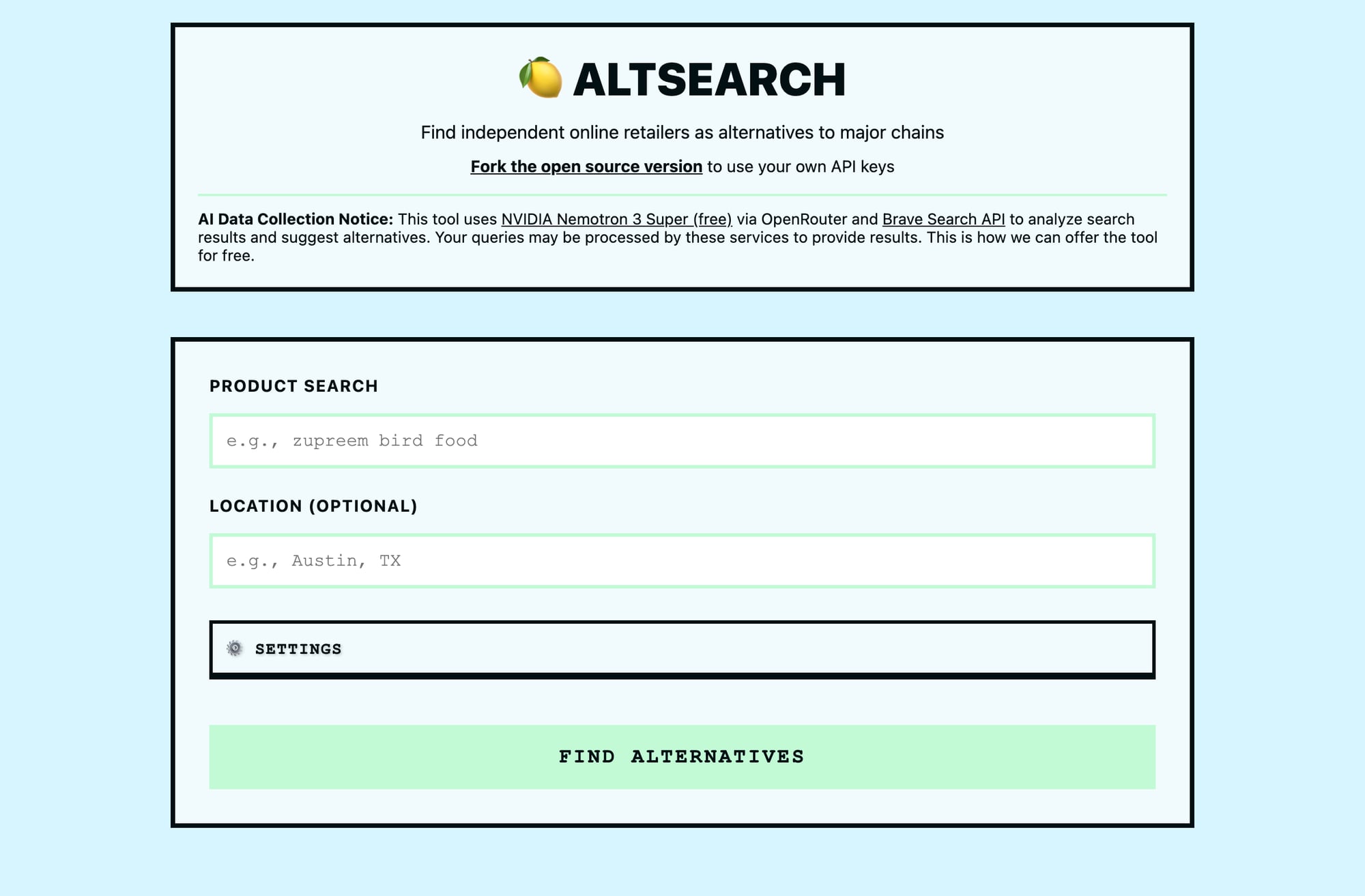
Altsearch is simple. You type in what you're looking for, it uses AI to search the web, filters out the major chains, and returns small businesses that sell it online.
That's it. No account, no tracking, no bullshit. Just a search box and results.
Try it: nataliewalls.com/altsearch
Why Build This
The "shop local" movement is great in theory. In practice, finding local or independent online retailers is a pain. They don't have Amazon's SEO budget, their websites aren't always polished, and Google's algorithm loves brands it recognizes.
I wanted a tool that did the research for me. Something that could parse search results, identify actual small businesses, verify they have online stores, and present options I'd never find on page one of Google.
Also, I wanted to see if I could build it in an afternoon. Turns out, yes. (12:40am edit: is it still the afternoon?)
The Stack
Cloudflare Workers for the backend. Single file, serverless, free tier that goes farther than you'd think. No database, no server to maintain, deploys in seconds.
Frontend is inline HTML in the same worker.js file. Brutalist design — eggshell background, thick black borders, Courier New, no rounded corners. Anti-corporate aesthetic for an anti-corporate tool.
AI is NVIDIA Nemotron 3 Super via OpenRouter. Free tier, decent quality, good at parsing search results and following instructions.
Search is Brave Search API. Better results than I expected, more ethical than Google, generous free tier.
The Build
Hour 1: Basic Search
Wire up Brave Search API, send query, get results back. Straightforward.
Early version did four searches in parallel (broad query, local query, specialty query, location query). Hit rate limits immediately. Brave doesn't like parallel requests, too expensive for prod anyway.
Lesson: Start simple. Add complexity only when forced to.
Hour 2: AI Filtering
Send search results to AI with instructions:
- Find small businesses
- Exclude major chains (Amazon, Walmart, etc.)
- Verify they have online stores
- Return 5-15 results depending on quality
Early prompts were too rigid. "Return exactly 5 results" meant the AI would pad the list with mediocre options when good ones were scarce.
Changed it to fuzzy guidelines: "If you find many excellent options, return up to 15. If limited, aim for 5. Quality over quantity."
Way better. AI now returns 3 results when that's all that's good, or 12 when the market is rich.
Also added a summary field where the AI explains result quality. "Found 8 excellent independent bird supply stores" or "Limited options available — try broader search." Honest feedback beats fake confidence.
Lesson: Give AI guidelines, not handcuffs.
Hour 3: Streaming Progress
Initial version: click search, stare at spinner for 60+ seconds, get results.
Terrible UX. Users don't know if it's working or frozen. I wouldn't use it.
Added Server-Sent Events (SSE). Backend streams progress updates as work happens:
- "Searching the web..."
- "Found 18 potential retailers"
- "Reasoning..." (AI is thinking)
- "Analyzing..." (AI is generating response)
- "Compiling results..."
Frontend listens to the stream and updates in real-time. Users see actual progress, not a fake spinner.
AI responses stream token-by-token. Show partial content as it generates. Feels faster even though it's not.
Also added time-based stage transitions. After 20 seconds: "This usually takes 60-90 seconds..." Sets expectations. Reduces anxiety.
Progress bar slows as it approaches 100%, sticks at 98% after 75 seconds. Avoids looking broken if the AI takes longer than expected.
Lesson: Users tolerate waiting if they see what's happening.
Hour 4: Polish & Deploy
Added a blocklist editor. Default list includes Amazon, Walmart, Petco, etc. Users can add more or remove ones they don't care about.
Added location awareness. If you enter "Austin, TX," it shows distance to nearest store and notes if it's online-only.
Added a results summary card. Color-coded by quality (green for excellent, red for limited). Brutalist borders, uppercase labels, high contrast.
Deployed to Cloudflare Workers. Set API keys as secrets, pushed to GitHub repo, done.
Whole project: ~4 hours. Most of that was fighting rate limits and tuning the AI prompts.
What I Learned
Cloudflare Workers are underrated. No config, instant deploys, global edge network, generous free tier. Better than managing a server for simple apps.
SSE makes AI feel fast, but only if they don't spend 30s doing opaque reasoning first. Streaming progress updates and partial responses transforms the UX. Users see work happening instead of guessing.
AI is better with fuzzy rules. "Return 5-15 results based on quality" beats "return exactly 5 results." Let the AI use judgment.
One good API call beats four mediocre ones. I thought parallel searches would improve coverage. Wrong. One comprehensive search with more results was faster and better.
Brutalist design works for tools. High contrast, thick borders, monospace fonts. It's harsh but honest. Fits the anti-corporate vibe.
Security Stuff
API keys are stored in Cloudflare Workers secrets, never exposed to the frontend. Input is validated (200-char limit on queries). CORS is configured. Rate limiting via Cloudflare.
No user data stored. Queries go to Brave Search and OpenRouter, disclosed in the UI. Transparent about the tradeoff: free tool in exchange for third-party processing.
Open-sourced the code. Removed all hardcoded secrets, wrote security docs, added .env.example.
You can deploy your own instance. Instructions in the README.
Cost
Cloudflare Workers: Free (100k requests/day)
OpenRouter (Nemotron free tier): $0
Brave Search: 2,000 queries/month free, then $5/1k
Running this costs me nothing. If it scales, maybe $5-10/month.
Is It Useful?
For me, yes. Found three independent bird supply stores I'd never heard of, ordered from one, bird is happy.
For you, maybe. If you're tired of Amazon being the only result, give it a shot.
If you're looking for something specific and want alternatives to the giants, it works. If you're browsing casually, probably not worth it.
The Next.js Problem (Evening, Hour 5-8)
Originally deployed as a standalone Cloudflare Pages site — pure HTML, external JavaScript, zero build process. Worked perfectly.
Then I wanted it on my blog at nataliewalls.com/altsearch instead of a separate subdomain. The blog runs on Next.js.
This is where things got complicated.
Next.js doesn't like inline scripts. Content Security Policy blocks them for security. External scripts get weird with hydration. What worked as pure HTML needed to become a React component.
Converting to Next.js
Created src/app/altsearch/page.tsx — a proper Next.js page with:
'use client'directive (client-side rendering required for SSE)- All JavaScript moved into
useEffecthook - CSS converted to
<style jsx global> - React-safe event handlers
The conversion itself wasn't hard. But then: caching hell.
Vercel's CDN aggressively caches Next.js builds. Deploy a fix, hit refresh, see old code. Cache-busting query params (?v=test) required for testing. Hard reloads don't always work. Wait 30-60 seconds for propagation.
I thought the app was broken multiple times. It wasn't. Just cached.
SSE Parsing Bug
The streaming progress wasn't working in production. Localhost worked fine. Production: stuck at "Searching the web..."
Root cause: I used escaped string literals \\n\\n instead of actual newlines \n\n for SSE parsing. JavaScript interpreted the backslashes literally instead of as escape sequences.
Localhost worked because Next.js dev mode has different bundling behavior. Production minified/optimized differently, exposed the bug.
Lesson learned: Test long-running async operations all the way through in production, not just locally.
Accessibility Pass
Got flagged for accessibility issues — content not in semantic landmarks, missing ARIA attributes.
Fixed:
- Wrapped content in
<main>,<header>,<section>instead of divs - Settings accordion: changed div to
<button>witharia-expanded/aria-controls - Results:
<article>with proper<h2>/<h3>heading hierarchy - Added
role="alert"on errors,aria-live="polite"on results - Added
aria-labelon links,rel="noopener noreferrer"for security
The accessibility improvements were good. But they only mattered because I was integrating with Next.js instead of shipping standalone HTML.
Color Iterations
Went through five color schemes before landing on final:
- Brutalist brown/tan (original)
- Soft blue + green
- Pale ice blue
- Bright sky blue
- Final: Pale blue background (#D6F5FF), mint green accent (#C2FAD5), black borders (#010F13)
Each iteration: edit locally, test, commit, push, wait for Vercel, wait for CDN, hard refresh, test again.
Total time on color tweaking: ~90 minutes. Because Next.js deployment isn't instant.
I still hate it.
The Curse of Next.js
Next.js is amazing for full-featured web apps. Auth, database, API routes, server components, edge middleware — all first-class.
But for a simple search tool? It's overkill.
The standalone Cloudflare Pages version deployed instantly, had zero caching issues, and required no build step. The Next.js version works, but it's more complicated than it needs to be.
Why I still did it: Wanted the tool at nataliewalls.com/altsearch, not a separate domain. Didn't want to maintain two versions. Blog is already on Next.js/Vercel, so integration made sense long-term.
But it's the classic framework tax. Use a framework, pay in complexity whether you need the features or not.
Final Architecture
Backend: Cloudflare Workers (unchanged)
- SSE streaming API at
/api/search-stream - CORS-enabled for any frontend
Frontend: Next.js page component
src/app/altsearch/page.tsxwith'use client'- All logic in useEffect hook (runs after DOM loads)
- Semantic HTML for accessibility
- Scoped CSS with jsx styling
Deployment:
- Backend:
wrangler deployto Cloudflare Workers - Frontend:
git pushtriggers Vercel build/deploy - Both on free tiers, total cost: $0/month
What I'd Do Differently
If building from scratch knowing I'd integrate with Next.js:
- Start with the React component. Don't build vanilla HTML first then convert. Saves time.
- Test in prod earlier. Localhost isn't reliable for SSE/streaming/async edge cases.
- Accept the framework tax up front. If the blog is Next.js, the tool should be too from day one.
- Use fewer color iterations. Pick one, commit, move on. Tweaking colors burns time with slow deployments.
But honestly? The standalone version was more fun to build. Next.js integration was necessary, not enjoyable.
Limitations
The tool works well for finding small businesses that sell products online. But it has some quirks:
-
Services don't work well. Search for "plumber" or "haircut" and you'll get online stores selling plumbing supplies or hair care products, not actual service providers. The tool is built for e-commerce, not local services.
-
Brick-and-mortar queries are hit-or-miss. Searching for "grocery store" or "bookstore" might return online retailers that ship food or books, not physical stores you can visit. The AI prioritizes "can you buy this online?" over "is there a physical location?"
If you're looking for a specific product to buy online from a small business, it works great. If you're looking for local services or physical retail locations, you'll probably be disappointed.
What's Next
The tool works. It's accessible. It's deployed. It's done.
Might add category presets (pet supplies, electronics, food). Might cache popular queries. Might add user accounts for saved searches.
Or might leave it as-is. Sometimes a tool is done when it works, not when it's perfect.
If people use it and want features, I'll build them. If not, it solved my problem and that's enough.
Try It
Search for something. See if it finds small businesses you didn't know existed. If it works for you, cool. If not, no hard feelings.
Source code: github.com/n8m8/altsearch
Note: This webapp evolved from an earlier OpenClaw skill. See DRIFT-ASSESSMENT.md for a detailed comparison of what changed and why.
P.S. — If you build something similar or want to talk about AI tooling, find me on Twitter @nataliefloraa. Always down to talk about making weird stuff.